
Reliable CBT for Schools. No Internet Required.
Omowe CBT empowers primary schools, colleges, and examination centres to deliver seamless, crash-resilient computer-based assessments across their local network — with zero cloud dependency, zero per-student internet data costs, and airtight anti-cheating supervision.
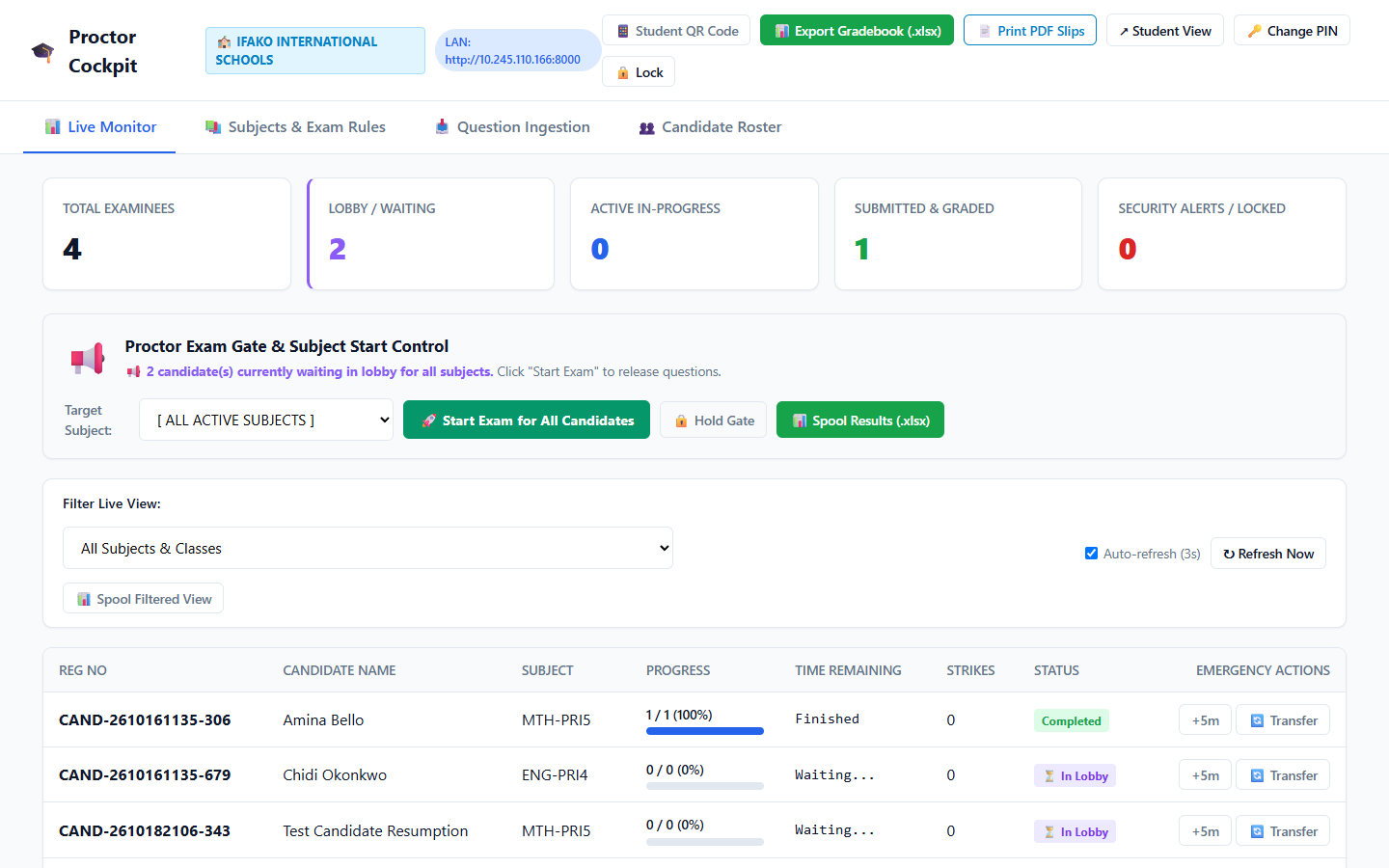
Your School's Network. Your Examination Environment.
Omowe CBT operates entirely on your institution's local area network (LAN). By eliminating third-party cloud servers and internet connections, your exams are immune to internet downtime, slow network buffering, and cyber intrusions.
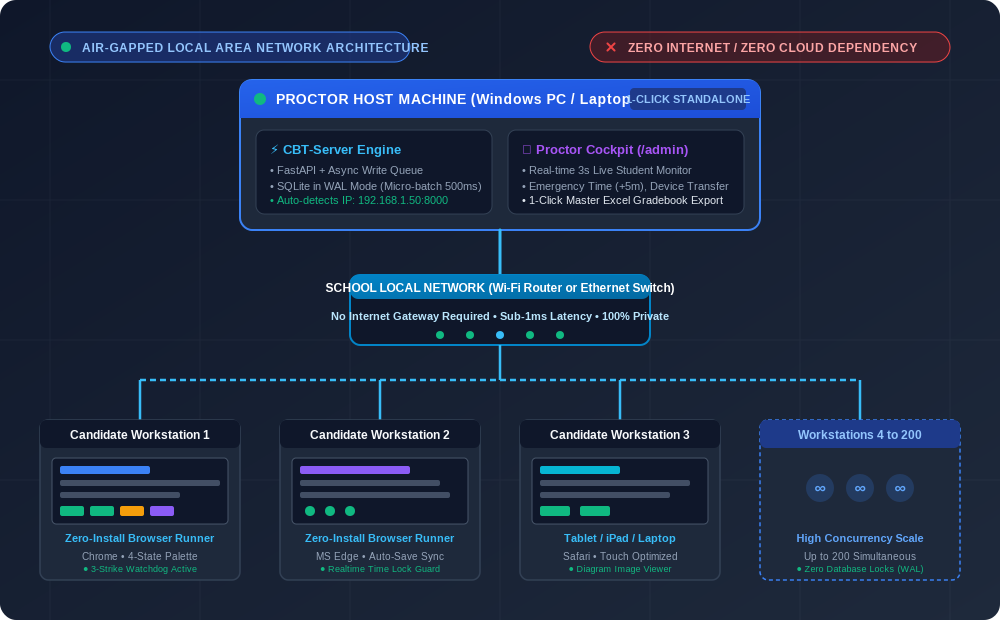
Standalone 1-Click Server Launch
Runs from a single standalone Windows executable (CBT-Server.exe) on the administrator's PC. Auto-detects the host IP, copies student URLs with one click, and includes a sleep-inhibitor to keep the host machine awake during active exams.
Zero-Install Client Access
Student workstations (lab desktops, laptops, Chromebooks, or tablets) do not require any installed client software. Examinees simply open Chrome, Edge, Safari, or Firefox and navigate to the local host IP.
In-Memory Batch Writes & SQLite WAL
Engineered with SQLite Write-Ahead Logging (WAL) and an in-memory asynchronous batch writer queue. Even with 200 examinees submitting answers simultaneously, responses are acknowledged instantly without database lock errors.
100% Offline Air-Gapped Security
All test questions, student records, and grading calculations remain strictly on your premises. Questions cannot be leaked to the public internet, and examinations proceed uninterrupted even during severe internet blackouts.
Built for Real-World School Environments
Every feature in Omowe CBT is engineered specifically to withstand erratic power supplies, diverse student devices, and the demands of high-stakes testing.
3-Strike Anti-Cheating Watchdog
A background supervisor tracks browser tab switches and window blur events. Candidates receive clear warning dialogs for strikes 1 and 2, and their test paper is automatically locked on the 3rd strike until released by the proctor.
Crash & Power-Cut Resilience
If a student computer suffers a battery drain, power disruption, or hardware failure, the proctor can authorize a station transfer. Logging in from any replacement PC restores their exact question sequence, answers, flags, and remaining time.
Proctor Cockpit & Live Telemetry
Supervisors monitor the entire examination room through a 3-second live telemetry dashboard displaying student progress percentages, remaining duration, strike count, and active workstation statuses.
Bulk Ingestion via Excel & ZIP
Upload hundreds of examination questions in seconds using formatted Excel (.xlsx) spreadsheets or complete ZIP packages containing diagrams and images. Automatic pre-flight dry-run validation catches errors before saving.
Diverse Question Types & Diagrams
Create comprehensive assessments across Sciences, Arts, and Commercial subjects. Supports Single Choice (MCQ), Multi-Select, True/False, Fill-in-the-Blank, and zoomable diagrams with explanations.
Instant Grading & Master Gradebooks
Exams are marked automatically the millisecond a student submits. Export master gradebooks directly to formatted Excel spreadsheets or print official individual candidate result slips with a single click.
From Setup to Results in 4 Simple Steps
Omowe CBT is designed so non-technical teachers and school administrators can manage examination sessions without IT specialists or terminal commands.
Prepare Examination
Import questions via formatted Excel or ZIP archives. Set your subject duration, question limits, pass percentage, shuffle rules, and negative marking preferences.
Connect Workstations
Double-click CBT-Server.exe on the host PC. Student devices connect to the local Wi-Fi or switch, open their browser, and type the auto-detected LAN IP.
Supervise Live Testing
Candidates complete tests with a 4-state question palette and countdown clock. The proctor monitors real-time progress bars, strikes, and remaining time on the cockpit.
Process & Export Results
Submissions are graded instantly by the server. Export styled master Excel gradebooks or print individual candidate result slips immediately after the exam finishes.
Take a Closer Look at Omowe CBT
Explore genuine screenshots captured directly from the running application. Review the administrative cockpit, student test runner, question ingestion, and results processing.
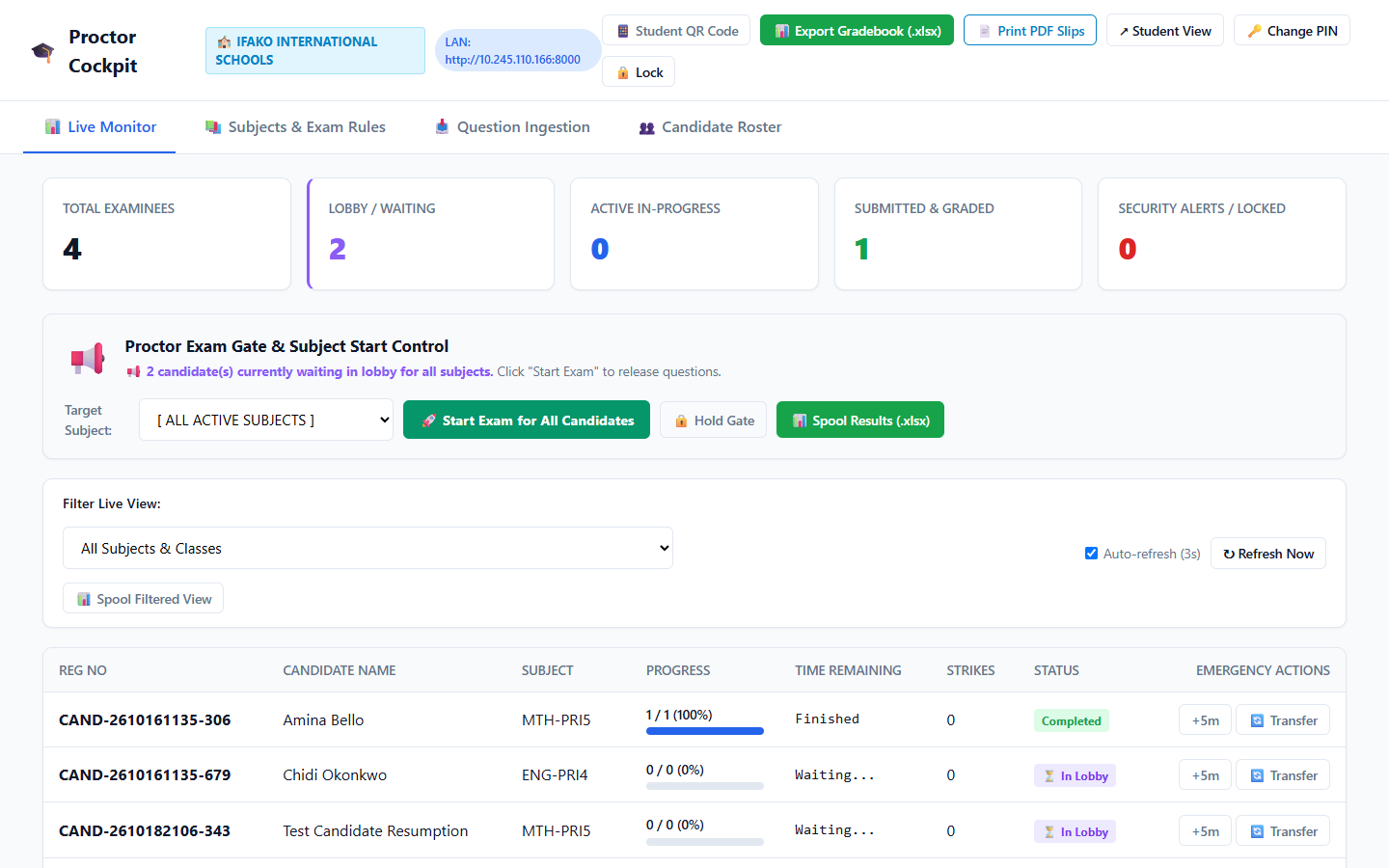
From Examination Setup to Results
See how Omowe CBT coordinates the entire examination lifecycle across administrators, test supervisors, and examinees.
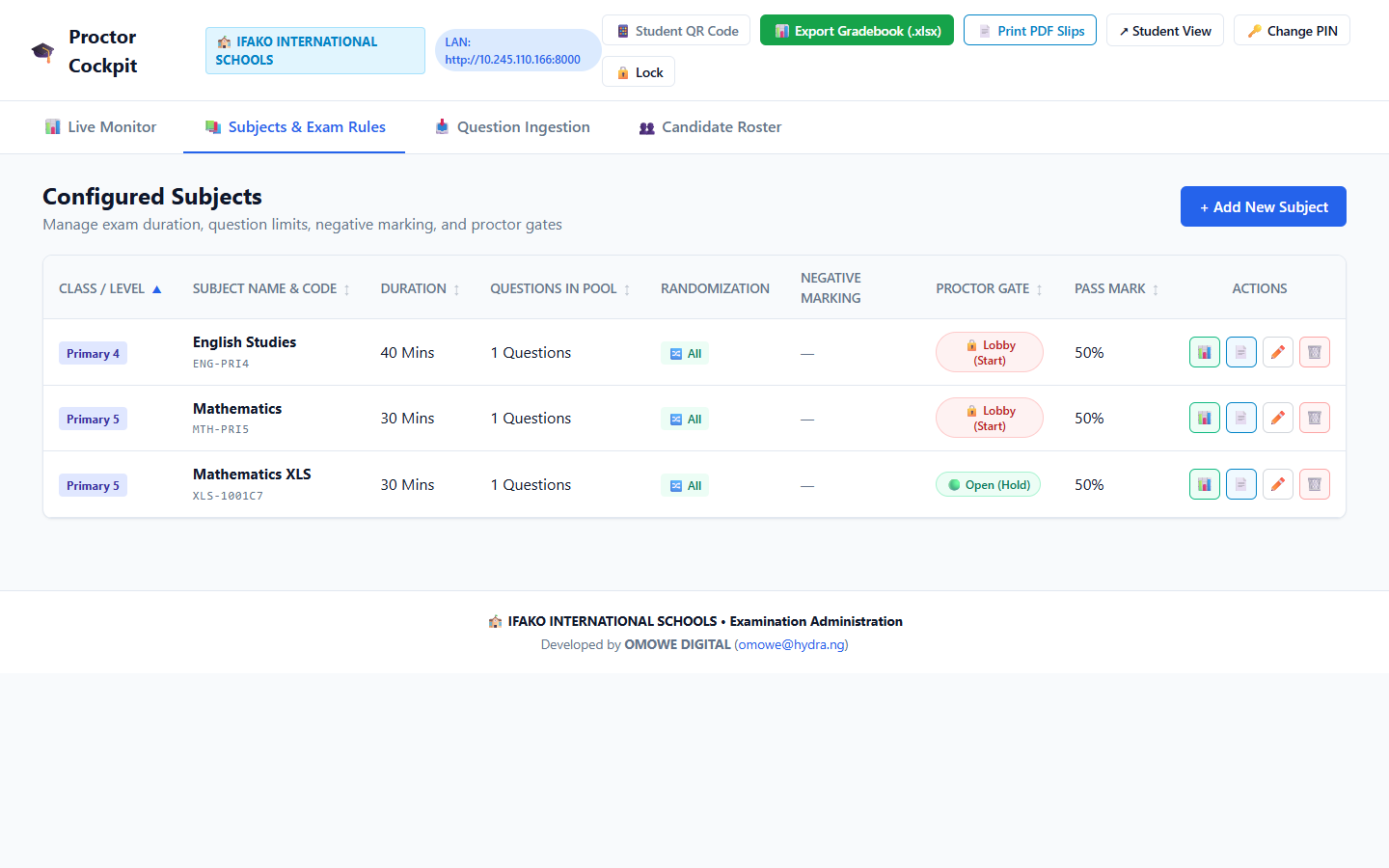
Tailor Exam Rules & Anti-Cheating Gates
Create subjects and configure exam policies with precision. Define exam duration, total questions to randomly pull from the question bank, shuffle options, pass mark percentage, and optional negative marking penalties.
Enable the Proctor Master Start Gate to hold all candidates in a synchronized waiting lobby until the examiner releases the exam simultaneously.
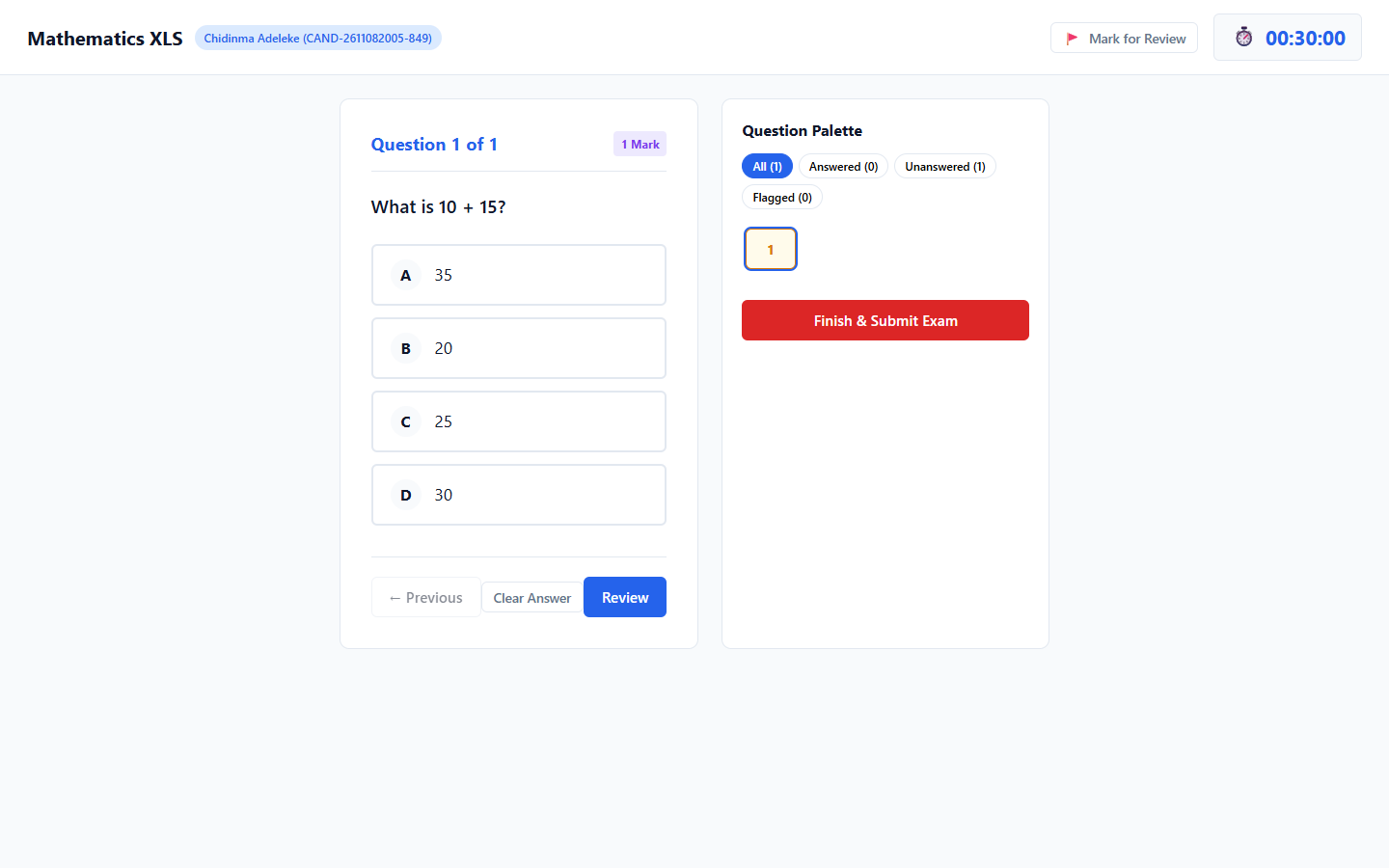
Calm, Distraction-Free Student Runner
The candidate interface is designed to reduce exam anxiety. Examinees navigate through a clean layout featuring a server-authoritative countdown clock, mark indicators, and clear option selectors.
The 4-State Question Palette color-codes unvisited (gray), visited/unanswered (orange), answered (green), and flagged questions (purple) so students never miss a question.
Proctor Cockpit & Instant Emergency Controls
Supervisors maintain full situational awareness across the entire exam hall. Every candidate's progress bar, remaining time, and security strike count updates live every 3 seconds.
If an examinee experiences an illness or computer breakdown, proctors can award emergency time extensions (+5m, +10m), authorize a replacement computer transfer, or remote force-submit papers.
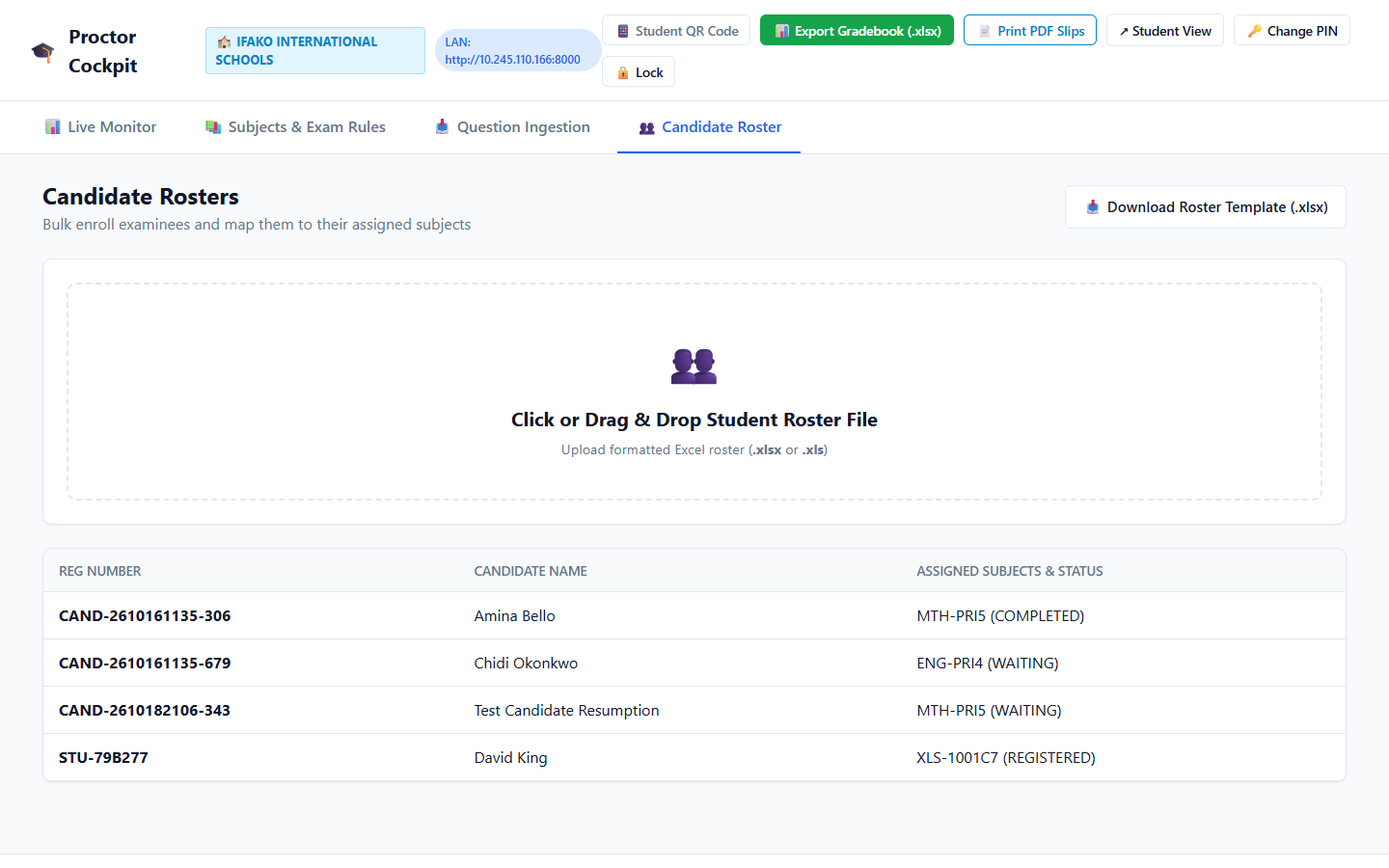
Instant Scoring & One-Click Master Gradebook
Eliminate days of manual test grading. Papers are scored instantly according to your subject rules the moment they are submitted.
Export comprehensive, beautifully styled master gradebooks in Excel (.xlsx) format with student scores, percentages, and pass/fail indicators, or generate printable individual PDF result slips.
Designed for Diverse Educational Environments
Omowe CBT adapts seamlessly to academic institutions of all sizes, eliminating ongoing internet bandwidth expenses and cloud software subscriptions.
Primary & Secondary Schools
Perfect for end-of-term examinations, mid-term continuous assessments, and mock entrance drills. Simple enough for teachers to run independently.
Term Exams & Continuous AssessmentColleges & Tertiary Institutions
Accommodates large student cohorts across multiple lecture halls. Supports distinct subject exams running concurrently in the same testing session.
Departmental Screening & ExamsCBT & Examination Centres
Ideal for independent computer-based testing facilities, mock JAMB/WAEC simulation centres, and candidate aptitude screening venues.
High-Volume Practice & CertificationTraining & Corporate Institutes
Deliver staff compliance tests, vocational evaluations, and professional licensing assessments in a secure, completely air-gapped environment.
Professional Skills AssessmentGot Questions? We Have Answers.
Learn more about the technical specifications, network requirements, and operational features of Omowe CBT.
No. Omowe CBT is 100% offline. It operates completely over your local area network (LAN) using a local Wi-Fi router, Ethernet switch, or direct Wi-Fi hotspot. No internet subscription, external modem, or cellular data connection is required during the examination.
A single host computer running Omowe CBT is performance-tuned to comfortably support up to 200 concurrent examinees. With SQLite in Write-Ahead Logging (WAL) mode and an asynchronous in-memory write buffer committing every 500ms, the system handles heavy simultaneous test submissions with zero database lock errors.
For the Host Server, a standard modern Windows PC or laptop (Windows 10 or 11, 8GB+ RAM, Intel Core i3 or equivalent) is recommended. For Student Workstations, any computer, laptop, Chromebook, or tablet with a modern web browser (Google Chrome, Microsoft Edge, Mozilla Firefox, or Apple Safari) can connect. No client software installation is required.
Omowe CBT includes full Crash & Power-Cut Recovery. All student responses and flags are persisted to the server every 500ms. If a student's computer dies, the proctor clicks "Unlock Station Transfer" on the Proctor Cockpit. The student can immediately log in from a replacement PC and resume with their exact question sequence, option scrambles, answered questions, and remaining time intact.
Questions can be ingested in bulk using standard Excel (.xlsx) spreadsheets. Download the provided template, populate your questions, options, point values, and correct answers, and upload it via the Question Ingestion tab. If your exam has diagrams or charts, simply bundle the spreadsheet and images in a .zip file for 1-click import.
Yes. Omowe CBT supports full multi-tenancy. For example, Primary 4 students can take English while Primary 5 students take Mathematics simultaneously in the same computer lab or hall, each governed by their specific subject durations, question banks, and pass marks.
The anti-cheating mechanism employs a three-tier model: 1) Complete air-gapping prevents internet searching; 2) Per-candidate scrambling ensures adjacent students have questions and options presented in randomized orders; and 3) A 3-Strike browser watchdog detects tab switching or window minimization, warning the candidate and locking their screen on the 3rd strike.
Once an examination concludes, the Proctor Cockpit provides instant 1-click export to a styled Excel (.xlsx) Master Gradebook containing candidate registration numbers, names, raw scores, percentages, and pass/fail indicators. You can also print official individual student result slips directly.
Yes. Comprehensive documentation, sample question packs, and user manuals are included. In addition, our deployment specialists provide hands-on onboarding, local network setup assistance, and teacher training sessions.
Simply fill out the enquiry form below or click the WhatsApp link to chat directly with our educational deployment team. We will schedule a personalized demonstration and provide a trial package for your institution.
Bring Reliable CBT to Your School
Say goodbye to internet interruptions, server crashes, and costly per-student cloud subscriptions. Experience how Omowe CBT can streamline examinations for your teachers and students.
⚡ Quick Deployment Guarantee
Omowe CBT can be deployed in your computer laboratory or school hall in under 30 minutes using standard local Wi-Fi routers or Ethernet switches.
Request a Demonstration
Please provide your institution details. You can submit directly via WhatsApp or Email.